Advanced IT Security Icons
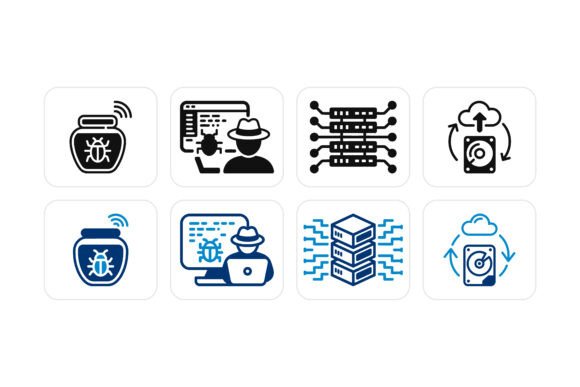
Visual clarity matters when communicating complex digital threats—whether you’re explaining ransomware to a school board, sketching a cloud migration plan for stakeholders, or designing a cybersecurity awareness poster for small business owners. Advanced IT Security Icons is a purpose-built vector icon set that turns abstract threats and infrastructure concepts into instantly recognizable, professional-grade visuals: hackers in hoodies, decoy honeypots, cascading DDoS waves, and modular server racks—all designed with technical accuracy and visual consistency.
Why visual precision matters in security communication
Unlike generic “shield” or “lock” icons, these illustrations reflect real-world components and attack patterns. A honeypot isn’t just a jar—it’s a deliberately exposed system with traffic indicators and logging hooks. A DDoS icon shows layered, converging vectors—not just a single arrow hitting a server. That specificity helps avoid miscommunication, especially when bridging knowledge gaps between teams. For network administrators, it supports documentation rigor. For educators, it grounds theory in tangible form. For marketers building a threat-intelligence dashboard, it adds credibility without clutter.
What makes this set different from standard icon libraries
This isn’t clip art repackaged as “cyber.” Every icon is built as a fully editable vector—no raster artifacts, no pixelation at any scale. You can isolate layers, adjust stroke weights, tweak node paths, or reassign colors using the included EPS source files. And with 100-color customization, you’re not stuck choosing from preset palettes. Need your SOC dashboard icons to match your brand’s indigo-to-teal gradient? Done. Want red for active threats, amber for warnings, and green for secured assets? Built-in.
For beginners learning cybersecurity concepts
If you're new to networking or studying for CompTIA Security+, icons help anchor vocabulary. Seeing a honeypot illustrated next to a firewall diagram reinforces how deception fits into defense-in-depth. You can drag one icon into a study flashcard, another into a Notion summary, and resize both without losing sharpness—even on a tablet screen. No design experience needed: just open, recolor, drop in. The simplicity lowers the barrier to creating clear, shareable notes—not just consuming content.
For IT professionals and network administrators
You don’t have time to redraw infrastructure diagrams every time policy changes. With Advanced IT Security Icons, you update a single layer—say, swapping an outdated rack layout for a modern hyperconverged unit—and propagate it across 12 slides or 3 internal wikis. Because everything scales losslessly, your Visio network map stays crisp whether printed on an A0 poster or embedded in a Slack status update. And since each icon reflects current architecture (e.g., cloud-native load balancers alongside legacy DMZs), your diagrams stay technically credible during audits or vendor reviews.
For educators and trainers
Telling students “a DDoS floods resources” is one thing. Showing them three distinct attack vectors—volumetric, protocol, and application-layer—each represented by a differentiated icon, makes the difference between memorization and mental modeling. These icons integrate cleanly into slide decks, handouts, and interactive e-learning modules. You can animate a honeypot icon “lighting up” when a simulated scan hits it—or use grayscale versions for print-friendly worksheets. The modularity means you control complexity: introduce one concept at a time, then layer in more elements as understanding grows.
For creators, designers, and content producers
Bloggers covering zero-trust architecture, podcasters illustrating episode show notes, or UX writers mapping user journeys through breach scenarios—all benefit from consistent, expressive visuals. Instead of hunting across five stock sites for matching styles, you get a unified set where the hacker icon shares the same line weight, perspective, and visual language as the encrypted database icon. That cohesion builds trust. Readers subconsciously register professionalism before they read a word. Plus, commercial licensing means you can use them in client deliverables—whitepapers, SaaS onboarding flows, or even merch for a cybersecurity conference—without clearing rights per asset.
For small business owners and non-technical decision makers
You may not configure firewalls—but you *do* approve budgets, review risk reports, and explain security posture to customers. Icons cut through jargon. A clean, labeled diagram using these assets helps you compare vendor proposals (“This provider includes honeypot monitoring—here’s what that looks like in practice”) or brief your team before a compliance audit. No need to hire a designer for basic visuals: spend 10 minutes customizing color and labels, and you’ve elevated your internal comms from bullet points to actionable insight.
How to tell if this fits your actual workflow
Ask yourself: Do you regularly explain, document, teach, or visualize anything related to networks, threats, or infrastructure? If yes, consider how much time you currently spend adapting visuals—or avoiding them entirely because good options are hard to find. This set shines when you need accuracy (not just aesthetics), flexibility (to match evolving tools or branding), and speed (to iterate without outsourcing).
It’s less ideal if you only need static PNGs for a one-off social post—or if your projects require photorealistic 3D renders. But for vector-based workflows—Figma, Illustrator, PowerPoint, Canva, Obsidian, or Confluence—it’s built to slot in seamlessly. And because source files are included, you’re never locked in: modify, extend, or archive as your needs change.
Practical examples across roles
- A freelance technical writer uses the server rack icons to annotate API documentation—color-coding dev/staging/prod environments directly in SVG diagrams.
- A community college instructor drops the DDoS icon into a quiz question asking students to identify mitigation strategies for each attack type shown.
- A startup CTO builds a live threat-modeling board in Miro, dragging and resizing icons to map attack surfaces as the product evolves.
- A nonprofit communications lead adapts the hacker icon (removing aggressive styling, adding neutral body language) for a public-facing “how phishing works” explainer—keeping clarity without sensationalism.
None of these uses require advanced design skills—just intention. And because the set prioritizes semantic accuracy over stylistic trends, it won’t feel dated next year. The icons reflect how infrastructure and threats actually behave—not how they look in a 2015 infographic.
Whether you're mapping a hybrid cloud environment or helping your aunt understand why she shouldn’t click that “urgent password reset” email, Advanced IT Security Icons meets you where you are—not with assumptions, but with adaptable, respectful, technically grounded visuals.