Crowd Silhouette Vector Set
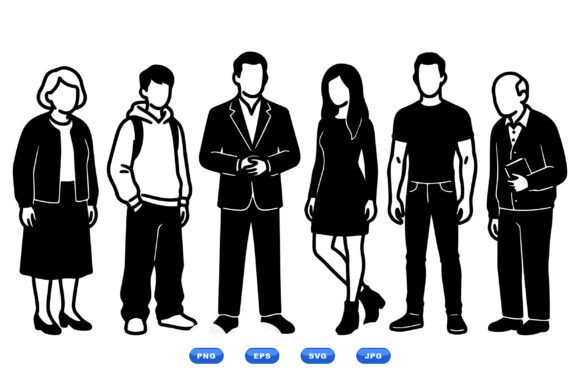
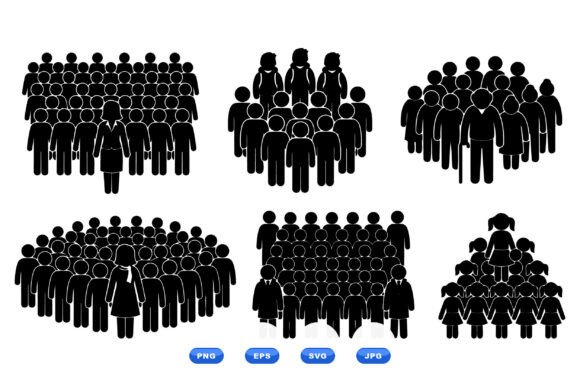
Need to visualize group dynamics—without clutter, ambiguity, or pixelation? The Crowd Silhouette Vector Set delivers clean, scalable, and instantly legible crowd representations for real-world design work. It’s not just another clipart pack. This is a purpose-built vector collection of six distinct crowd formations—each thoughtfully composed with frontline leaders, children, and elderly figures—to reflect diversity in age, role, and positioning.
What Makes This Set Stand Out
Unlike generic crowd icons, this set prioritizes narrative clarity and functional flexibility. Every silhouette grouping tells a subtle story: a forward-facing team led by a central figure; a multigenerational gathering arranged in a gentle arc; a compact cluster suggesting collaboration or community support. No gradients, no shadows—just pure black-and-white contrast. That high-contrast, monochrome approach isn’t stylistic shorthand—it’s intentional design discipline. It ensures readability at tiny sizes (think mobile app icons or wayfinding signage) and maximum adaptability across print, screen, and embossed media.
All six formations are 100% vector-based—SVG and EPS files included—and fully editable in Illustrator, Affinity Designer, Figma (via SVG import), or any vector-compatible tool. That means you can recolor individual figures, isolate age groups, scale to billboard size without loss, or convert to cutting paths for vinyl signage or laser engraving—all without compromising edge sharpness.
Where This Set Adds Real Value
Professionals don’t reach for vectors just to “fill space.” They use them to communicate faster, reduce revision cycles, and maintain visual consistency across touchpoints. Here’s where the Crowd Silhouette Vector Set proves its utility:
- Educators and trainers embed these into lesson plans, workshop handouts, or accessibility guides—using the child-and-elderly groupings to illustrate intergenerational learning or inclusive participation models.
- Healthcare communicators deploy the frontline leader + supportive crowd layout in patient education materials, public health campaigns, or clinic signage—conveying trust, guidance, and collective care without text dependency.
- UX designers and product teams use the formations as placeholder assets during wireframing or user flow mapping—testing how crowd density and hierarchy affect perceived scalability or service capacity before committing to custom illustrations.
- Nonprofits and advocacy groups apply the sets across annual reports, donor presentations, and social media graphics—leveraging the neutral, human-centered aesthetic to emphasize shared goals over branding noise.
- Small business owners integrate them into local event posters, shop window decals, or community board flyers—especially effective when promoting workshops, neighborhood cleanups, or senior outreach programs.
No Compromises on File Quality or Workflow Fit
The download arrives as a single ZIP folder containing SVG, PNG, JPG, and EPS versions of all six crowd formations. That multi-format inclusion isn’t about redundancy—it’s about matching file types to real tasks. Use SVG for responsive web graphics or interactive dashboards. Drop the high-res PNGs into PowerPoint decks or Canva templates without worrying about scaling artifacts. Rely on EPS for legacy print workflows or large-format output where PostScript compatibility still matters. And because every vector retains layered structure (no flattened paths), you can easily delete, reposition, or relabel individual silhouettes—say, removing the leader figure to imply peer-led activity instead of top-down instruction.
Practical Tips Before You Use It
Start by auditing your current visuals: Are your crowd depictions vague, overly stylized, or inconsistent across platforms? If yes, this set offers immediate cohesion. But don’t default to using all six layouts at once—select only the formation that matches your message’s intent. A circular arrangement implies equality and dialogue; a linear front-row formation signals leadership or presentation. Match structure to meaning.
Also consider context sensitivity. While the black-and-white palette ensures versatility, it doesn’t automatically guarantee inclusivity. Pair the Crowd Silhouette Vector Set with thoughtful copy, accessible color contrast in surrounding layouts, and alt-text descriptions when used digitally. For example, “Group of five people—two adults, one child, two elders—standing in semi-circle around a central speaker” gives screen reader users meaningful context beyond “crowd icon.”
If you’re integrating into brand guidelines, test how the silhouettes hold up against your primary colors. Their stark contrast works well with muted palettes (navy, charcoal, olive) but may feel visually heavy next to bright neons unless balanced with ample white space or supporting typography.
A Tool That Scales With Your Needs
This isn’t a “set it and forget it” graphic library. Because each crowd formation is built from discrete, named layers, you can repurpose elements across projects. Extract the child silhouette to build custom family unit icons. Isolate the elder figures for retirement planning infographics. Combine leader outlines from different formations to create composite leadership models—say, a triad representing governance, operations, and community input.
Freelancers appreciate how quickly this set shortens client feedback loops. Instead of sketching variations from scratch, you present three refined crowd options—each with clear rationale (“This formation emphasizes collective action; this one highlights mentorship”)—and move faster into refinement than iteration.
And for publishers building modular content systems—think template-driven reports or configurable dashboard widgets—the Crowd Silhouette Vector Set serves as reliable, resolution-agnostic building blocks. No need to chase stock photo licenses or wrestle with raster cropping. Just drop, adjust, and ship.
Final Thought: Clarity Over Decoration
In an era of visual overload, restraint becomes a strategic advantage. The Crowd Silhouette Vector Set succeeds because it refuses to distract. It doesn’t simulate realism—it communicates relationships. It doesn’t mimic photography—it clarifies roles. Whether you’re designing a city council meeting agenda, prototyping a civic engagement app, or illustrating a sociology textbook chapter, this set gives you precision, speed, and quiet authority—without asking for credit.