Flat Tree Icon Set
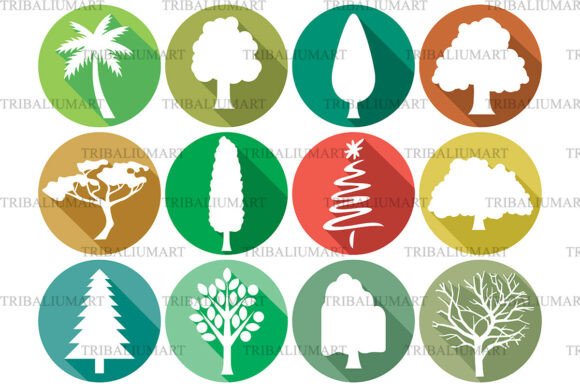
The Flat Tree Icon Set is a curated collection of 12 vector-based tree illustrations designed in a modern flat design style. Each icon features a distinct tree type—including palm, pine, oak, Christmas tree, bare winter tree, and several stylized interpretations—rendered in vibrant colors against clean circular backgrounds. The set is delivered as a single ZIP file containing all 12 icons in five widely supported formats: SVG, EPS, JPEG, PNG, and PDF.
This format structure means users receive the full set in each format—not individual files per icon per format—simplifying organization and reducing redundancy when integrating into different workflows. It’s important to note that these are digital-only assets; no physical items are shipped, and no licensing or usage support is included beyond what’s specified in the standard license.
Why Consider the Flat Tree Icon Set?
Designers, developers, and content creators often need cohesive, scalable nature-themed icons for projects ranging from mobile apps and interactive maps to educational infographics and eco-conscious branding. A well-designed tree icon set can reinforce visual hierarchy, communicate environmental themes efficiently, and maintain stylistic consistency across interfaces.
The Flat Tree Icon Set addresses this need with deliberate stylistic choices: uniform circular framing, consistent stroke weight, balanced negative space, and a limited but expressive color palette. Its flat aesthetic ensures compatibility with contemporary UI guidelines, while the variety of species supports nuanced messaging—e.g., using a palm tree to signal tropical context, a pine for evergreen or mountain themes, or a bare tree to evoke seasonal change or minimalism.
Practical Benefits and Real-World Fit
One key advantage is format versatility. SVG and EPS files support infinite scalability without quality loss, making them suitable for responsive web layouts or high-resolution print. PNG files include transparent backgrounds for easy layering in presentations or mockups. JPEG offers broad compatibility for quick previews or documentation. PDF enables direct embedding in design tools like Adobe InDesign or Illustrator for layout refinement.
The set works especially well in contexts where thematic clarity and visual harmony matter more than photorealism. For example:
- Web and app dashboards that display ecological data or sustainability metrics;
- Educational platforms teaching botany, geography, or climate science;
- Branding projects for parks departments, gardening services, or green startups seeking approachable, nature-aligned visuals;
- Infographics comparing tree species, carbon sequestration rates, or regional flora;
- Sticker sheets or social media assets where bold, recognizable shapes perform well at small sizes.
Because all icons share the same design language—including proportions, corner treatment, and background treatment—the set reduces time spent adjusting alignment or contrast across related graphics.
Tradeoffs and Considerations
While the Flat Tree Icon Set delivers consistency and ease of use, it also makes certain intentional tradeoffs. Its flat, simplified forms prioritize clarity over botanical accuracy. Users needing highly detailed silhouettes, realistic textures, or species-specific identifiers (e.g., distinguishing between red oak and white oak) may find the stylization limiting. Similarly, the fixed circular background—while unifying—may not suit layouts requiring irregular cropping, overlapping elements, or background transparency without manual editing.
Another consideration is software readiness. While SVG and PNG files work in most modern browsers and design tools, EPS and PDF files require vector-editing applications such as Adobe Illustrator or Affinity Designer for full editing capability. JPEG files, though universally viewable, are raster-based and not editable without loss of fidelity. Users unfamiliar with vector formats or lacking access to compatible software may face a learning curve—or need to rely on pre-rendered PNG/JPEG versions only.
Licensing terms also warrant attention. Unless otherwise stated, standard licenses typically permit unlimited use in personal and commercial projects, but prohibit resale or redistribution of the icons as standalone assets. Always verify the specific license before deploying in client work or products intended for redistribution.
When Alternatives May Be More Appropriate
The Flat Tree Icon Set is strongest when consistency, speed of integration, and thematic cohesion are priorities. However, alternative options may better serve certain needs:
- Custom illustration projects: If brand identity demands unique line work, bespoke color systems, or integration with existing character sets, commissioning original artwork may yield stronger results than adapting pre-made icons.
- Technical or scientific applications: Fields like forestry research or botanical education may require taxonomically precise representations—something stylized icons inherently simplify.
- Dynamic or animated interfaces: This set contains static illustrations only. Projects needing interactive states (e.g., growing trees, seasonal transitions) would require custom development beyond the provided assets.
- Highly constrained color palettes: While the set uses vibrant hues, teams working within strict accessibility-compliant or monochrome brand guidelines may need to recolor icons manually—or seek grayscale-optimized alternatives.
Making an Informed Decision
To determine whether the Flat Tree Icon Set aligns with your goals, ask yourself three questions:
- Do I need a small, focused set of cohesive tree icons—and am I comfortable with stylized, non-photorealistic representations? If yes, this set offers efficiency and visual unity.
- Will I use multiple file formats across different stages of my workflow? The inclusion of SVG, EPS, PNG, JPEG, and PDF increases flexibility—but only if you have the tools and knowledge to leverage them.
- Is my project timeline sensitive, and does consistency outweigh the need for fine-grained customization? Pre-designed, production-ready icons reduce iteration time compared to building from scratch or modifying disparate sources.
If the answer to most of these is “yes,” the Flat Tree Icon Set is likely a practical match. If your work demands greater specificity, adaptability, or technical fidelity—and you have the resources to invest in custom solutions—the set may serve better as inspiration than implementation.
Ultimately, evaluating any icon set involves balancing creative intent, technical requirements, and operational constraints. The Flat Tree Icon Set provides a clear, focused solution within its scope—neither universal nor exhaustive, but purpose-built for designers who value clarity, color, and consistency in nature-themed visual communication.