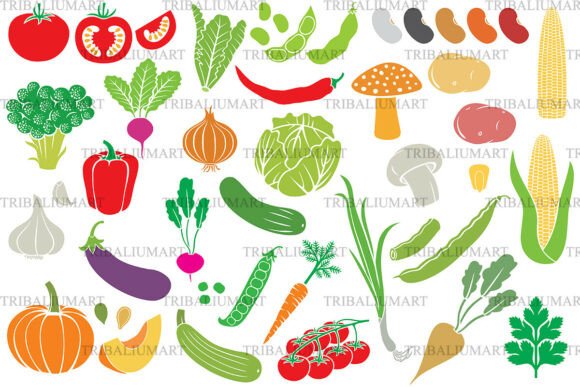
Vegetables Icon Set: Design Clarity for Today’s Health-Focused Visual Communication
Visual language matters—especially when communicating nutrition, wellness, or food-related ideas. The Vegetables Icon Set isn’t just another collection of clipart-style graphics. It’s a purpose-built, cohesive toolkit of 30 distinct, hand-crafted icons representing fresh vegetables and legumes—from tomato and carrot to broccoli, eggplant, pumpkin, corn, beans, mushrooms, garlic, onion, pepper, and cucumber—designed with intention for real-world use.
Why Fresh Vegetable Icons Are More Than Just Decoration
In an era where digital health literacy is rising—and consumers increasingly seek transparency around ingredients, sourcing, and dietary impact—icons serve as visual shorthand. A well-designed vegetable icon doesn’t just say “carrot.” It signals freshness, whole-food integrity, seasonal eating, or plant-forward choices. That subtle cue builds trust faster than text alone, especially in fast-scrolling environments like mobile apps, social media infographics, or grocery packaging.
This matters because attention spans are short, but expectations for clarity are high. Users don’t want to decode vague symbols—they want immediate recognition. The Vegetables Icon Set delivers that through consistent flat vector styling: clean lines, balanced proportions, and intentional color palettes that reflect natural vibrancy without oversaturation. Each icon stands alone yet belongs to a unified family—critical for maintaining brand coherence across touchpoints.
How Modern Workflows Demand Format Flexibility
Designers, developers, educators, and small business owners rarely work in a single environment. One day you’re adjusting a nutrition blog banner in Figma (where SVG shines), the next you’re prepping print-ready cookbook layouts in Adobe InDesign (requiring EPS or PDF), and later you’re uploading assets to a WordPress site (needing optimized PNG or JPEG). The Vegetables Icon Set anticipates this reality: every icon is delivered in SVG, EPS, JPEG, PNG, and PDF—all included in one ZIP file, with all 30 icons available in each format.
This isn’t about redundancy—it’s about reducing friction. No more converting files mid-project or hunting down missing resolutions. Need a scalable version for a responsive web menu? Use SVG. Preparing a presentation slide for a school nutrition workshop? Drop in the high-res PNG. Finalizing eco-friendly packaging with a printer who requires vector PDFs? It’s ready. That level of cross-format readiness reflects how professional workflows have evolved: less time managing assets, more time communicating meaningfully.
Real-World Uses You’ll Recognize
- Healthy food apps: Sorting filters (“show only recipes with bell peppers”), meal planner tags, or progress trackers benefit from instantly recognizable vegetable icons that support usability and accessibility.
- Cookbooks & recipe blogs: Replacing generic bullet points with vegetable-specific icons improves scannability and adds visual rhythm—particularly helpful for readers scanning for allergens, substitutions, or seasonal swaps.
- Packaging & labels: Brands emphasizing farm-to-table authenticity or clean-label claims use vegetable icons to reinforce ingredient transparency—without crowding limited label space.
- Educational materials: Teachers building nutrition curricula or dietitians designing client handouts find these icons effective for visual scaffolding—especially when supporting diverse learning styles or multilingual audiences.
- Infographics & social content: Data about fiber intake, seasonal produce availability, or legume-based protein sources becomes more engaging when anchored by accurate, expressive icons—not stock illustrations that feel disconnected or overly stylized.
Beyond Aesthetics: What Makes This Set Functionally Distinct
Not all vegetable icon sets are built for longevity—or practical reuse. Some prioritize artistic flair over consistency; others sacrifice scalability for detail. The Vegetables Icon Set avoids those trade-offs. Its flat vector style ensures crisp rendering at any size—from a 16-pixel app icon to a 48-inch trade show banner. The color palette uses accessible contrast ratios, supporting readability for users with varying visual needs. And because all 30 icons share the same visual grammar—similar stroke weights, corner radii, and negative space treatment—they integrate seamlessly into existing design systems.
That consistency supports scalability in more than one sense. For freelancers juggling multiple clients, it means reusing the same trusted asset across branding projects without visual whiplash. For startups launching meal-kit services or wellness platforms, it means establishing a recognizable visual identity early—without needing custom illustration for every vegetable category.
Trends Driving Demand—Without the Hype
Three quiet but powerful shifts are increasing reliance on precise, reusable food-related visuals:
- The rise of plant-forward eating: It’s no longer just about vegetarianism or veganism—it’s about flexitarian habits, climate-conscious choices, and culinary curiosity. Icons help normalize variety beyond the usual suspects (lettuce, tomato, apple) by giving visual weight to lesser-represented items like fennel, okra, or black-eyed peas.
- Digital-first nutrition education: With telehealth, online coaching, and self-guided wellness tools growing, there’s greater need for clear, non-verbal communication—especially where language barriers or low health literacy exist. Icons bridge gaps without oversimplifying.
- Sustainability-driven packaging design: As brands reduce printed materials and shift toward digital labeling (QR codes linking to ingredient stories), icons become even more essential for quick visual cues on physical packages—supporting both sustainability goals and shopper decision-making.
What to Know Before You Download
This is a digital-only product: no physical items will be shipped. You’ll receive one ZIP file containing the full set—30 icons—in SVG, EPS, JPEG, PNG, and PDF formats. That structure means you’re not downloading dozens of separate folders or hunting for individual files. Everything is organized, labeled clearly, and ready to deploy.
That said, it does assume baseline familiarity with common design software. SVG files work natively in modern browsers and most UI tools (Figma, Sketch, Adobe XD); EPS and PDF suit vector-heavy workflows (Illustrator, InDesign); JPEG and PNG provide raster options for web or presentation use. If you're new to working with vector assets, consider reviewing basic import/export steps for your preferred tool before purchase—most platforms offer free tutorials.
A Tool That Grows With Your Needs
Icon sets often get pigeonholed as “one-time-use” assets. But the Vegetables Icon Set is built for iteration. Its modular nature means you can combine icons with typography, data visualizations, or photography to create layered narratives—say, pairing the broccoli icon with a leafy green gradient and a stat about daily fiber intake. Or using the garlic and onion icons side-by-side in a “pantry staples” section of a meal-prep guide.
It also adapts to evolving standards. As WCAG guidelines tighten around color contrast and alt-text requirements, having clean, labeled SVGs makes accessibility updates more manageable. As new platforms emerge—like AR menus or voice-assisted cooking interfaces—scalable, semantic vector assets remain foundational.
Ultimately, the value isn’t in the number of icons, but in how reliably they support your message. Whether you’re a nutritionist simplifying complex concepts for clients, a developer building a food-tracking app, or a small-batch producer designing compostable packaging—the Vegetables Icon Set offers clarity, consistency, and creative room to grow.